Migrating a Remix Project to Cloudflare

Migrating a Remix Project to Cloudflare
Recently I developed a project using remix. I hadn’t done full-stack development before; I’d used reactjs a bit but wasn’t very familiar with it, and I was using Nextjs, which felt very hard to use — mainly because after version 13 switched to the app router, I was somewhat at a loss.
Later I discovered remix, which uses filename-based routing directly and is much more convenient, and the loader and action approach is also very intuitive, so I chose remix.
Once the project was mostly developed, I thought about how to deploy it. I had originally planned to use Vercel, but one day I saw https://blog.meathill.com/infra/vercel-vs-cloudflare-pages-how-to-choose-to-deploy-your-website.html and still felt cloudflare was impressive (good for free riding).
So I prepared to migrate to cloudflare.
Steps
remix supports creating a project that deploys directly to cloudflare, but mine is already a project in development, so I can’t create it from the template.
Copy files
First create a cloudflare template project with remix: pnpm create cloudflare@latest my-remix-app -- --framework=remix
After creating it, compare it with my own project:
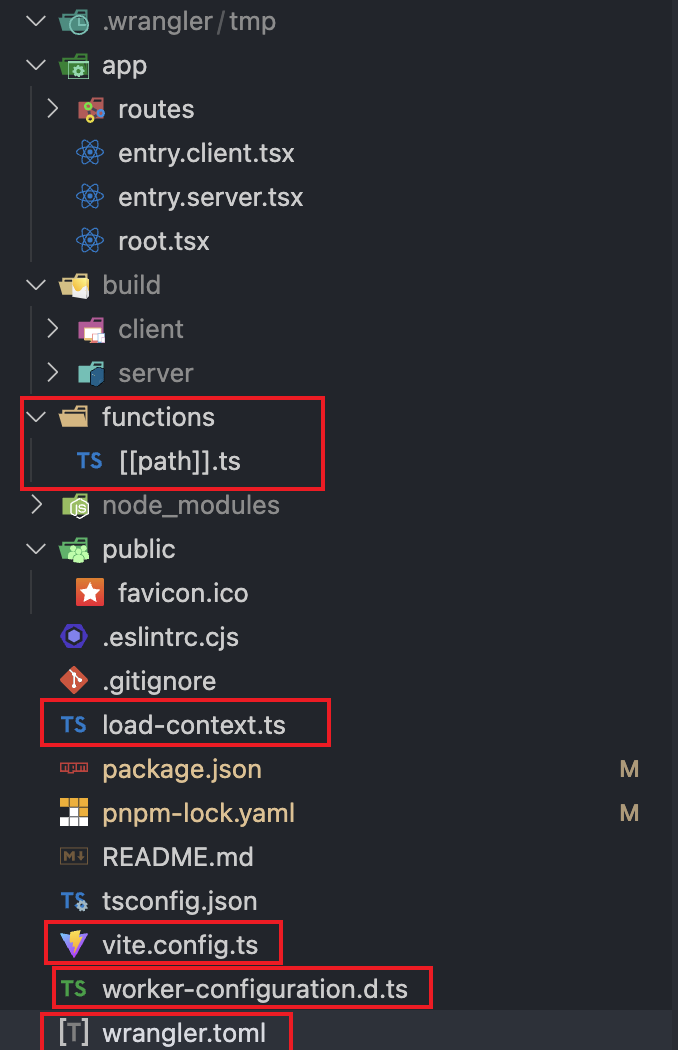 These extra files appeared; copy them over.
Install libraries
|
|
File modifications
Add to tsconfig.json:
|
|
wrangler.toml
Configure wrangler.toml as needed — configure whatever you use. I used d1_database, r2_buckets, etc.
postcss.config.cjs[js]
|
|
tailwind.css
|
|
entry.server.tsx
|
|
root.tsx
|
|
Note this: import styles from './tailwind.css?url';, there’s an extra ?url
package.json
|
|
Node compatibility
According to the official  , some core
nodejs libraries cannot run directly in worker pages. There are two methods; the first is Use runtime APIs directly, which I didn’t get working. I used the second, Add polyfills using Wrangler, adding to wrangler.toml: node_compat = true. Note that the two are not compatible.
Prisma migration
The database was previously PostgresSQL, and now it needs to be migrated to D1 Database. The common Prisma documentation: https://www.prisma.io/docs/orm/prisma-client/deployment/edge/deploy-to-cloudflare
Assume the database name is my-d1. First generate the sql:
pnpm npx wrangler d1 migrations create my-d1 --local
This generates a migration directory locally. Then execute:
|
|
The first time you generate a migration file, it will be stored in migrations/0001_init_.sql.
Execute the migration file: pnpm npx wrangler d1 migrations apply my-d1 --local
At this point the migration is done, but sure enough, something went wrong:
|
|
This thing doesn’t say which line of code either; the hinted 41 isn’t it at all. I had to delete line by line and experiment, and finally found it was the error from: ALTER TABLE "tablename" ADD CONSTRAINT
I looked it up: https://developers.cloudflare.com/d1/reference/migrations/#foreign-key-constraints
Using bindings
When using bindings in cloudflare pages, such as KV and R2, I kept failing to read these bindings. After studying and testing carefully many times, I found some steps:
functions/[[path]].ts
|
|
getLoadContext needs to set env: context.context.cloudflare.env
wrangler.toml
In the file you need to configure the information for the corresponding binding, and in the dashboard of cloudflare pages, you also need to configure the binding for the corresponding environment (production, preview), with the same name
typegen
After modifying the bindings in wrangler.toml or the dashboard, you need to run: pnpm run types, that is: wrangler types, which will generate the worker-configuration.d.ts file, and the corresponding settings in wrangler.toml will be updated:
|
|
Using on the remix server side:
|
|