Using ChatGPT to Write a Script for Generating Chinese Subtitles for Video Files
Background
For some obscure movies or videos, it is hard to find Chinese subtitles even though they have a plot, so in these cases you have to add Chinese subtitles manually. But adding Chinese subtitles by hand is extremely time-consuming, especially for long videos. So I wanted to use ChatGPT to help me write a script that can automatically generate Chinese subtitles for video files.
Approach
First, break the process down into a few steps:
- Use
ffmpeg to extract the audio from the video file
- Use
whisper.cpp to convert the audio file into a text file
- Use
chatgpt-subtitle-translator to translate the text file into Chinese subtitles
The command for each step is roughly as follows:
ffmpeg -i input.mp4 -hide_banner -vn -loglevel error -ar 16000 -ac 1 -c:a pcm_s16le -y output.wav -progress -
whisper.cpp can also translate, but only into English. If you then translate that English output into Chinese, the result will be worse, so here it is only used to extract text (English).
./main -m models/ggml-small.bin -l $WHISPER_LANGUAGE -f $AUDIO_FILE_PATH -t 8 -osrt
This command converts the audio file at $AUDIO_FILE_PATH into a text file and saves it as an English .srt subtitle. $WHISPER_LANGUAGE specifies the language, which here can be English or another language. -t 8 specifies the number of threads, which you can adjust according to your computer’s performance.
Translating text with chatgpt-subtitle-translator
I originally planned to write a script myself to call the openai API to translate the text, but then I found that someone had already written one called chatgpt-subtitle-translator, which I could use directly. For how to use it, refer to here.
The chatgpt Conversation Process
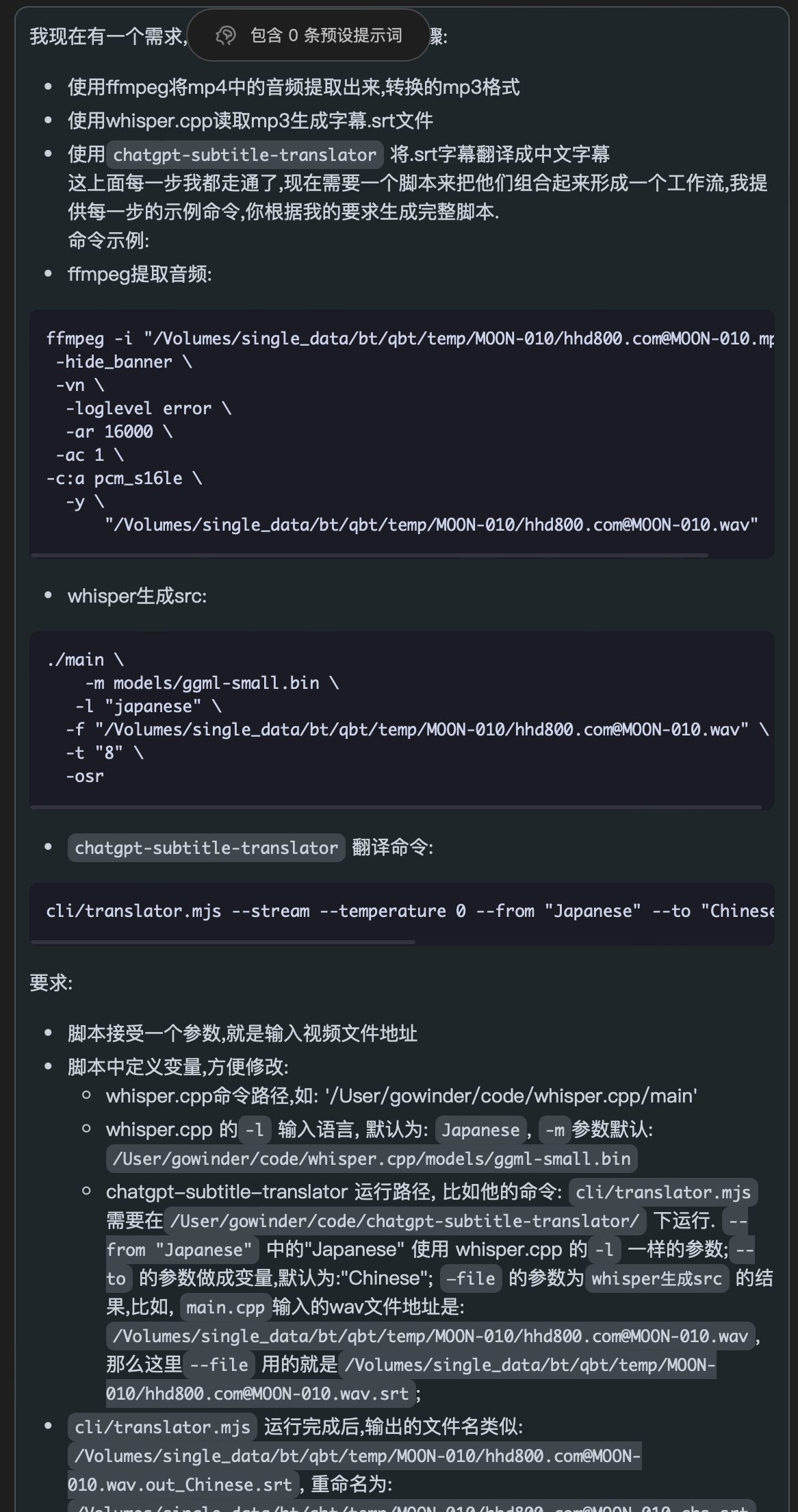
First prompt:

I described the problem very clearly: what the steps were, what each step did, and my specific requirements. The answer it gave in the first step was:
 1
 2
 3
 4
 5
 6
 7
 8
 9
10
11
12
13
14
15
16
17
18
19
20
21
22
23
24
25
26
|
#!/bin/bash

# Define variables
VIDEO_FILE_PATH=\$1
WHISPER_PATH="/User/gowinder/code/whisper.cpp/main"
WHISPER_LANGUAGE="Japanese"
WHISPER_MODEL="/User/gowinder/code/whisper.cpp/models/ggml-small.bin"
TRANSLATOR_PATH="/User/gowinder/code/chatgpt-subtitle-translator/"
TRANSLATOR_TO_LANGUAGE="Chinese"

# Extract audio and convert to wav format
AUDIO_FILE_PATH="${VIDEO_FILE_PATH%.*}.wav"
ffmpeg -i "$VIDEO_FILE_PATH" -hide_banner -vn -loglevel error -ar 16000 -ac 1 -c:a pcm_s16le -y "$AUDIO_FILE_PATH"

# Use whisper to generate the srt subtitle file
SRT_FILE_PATH="${AUDIO_FILE_PATH%.*}.srt"
$WHISPER_PATH -m $WHISPER_MODEL -l $WHISPER_LANGUAGE -f "$AUDIO_FILE_PATH" -t "8" -osr

# Use ChatGPT to translate the subtitles
TRANSLATED_SRT_FILE_PATH="${AUDIO_FILE_PATH%.*}.out_${TRANSLATOR_TO_LANGUAGE}.srt"
cd $TRANSLATOR_PATH
cli/translator.mjs --stream --temperature 0 --from "$WHISPER_LANGUAGE" --to "$TRANSLATOR_TO_LANGUAGE" --file "$SRT_FILE_PATH"

# Rename the output file
FINAL_SRT_FILE_PATH="${AUDIO_FILE_PATH%.*}.chs.srt"
mv "$TRANSLATED_SRT_FILE_PATH" "$FINAL_SRT_FILE_PATH"
|
At this point the reply had basically already edited what I needed, but there were still a few problems, such as not checking the return result of each step, so I continued:
Second prompt:
1
2
3
|
Need changes:
- Check whether each step completes normally, and exit if not
- In the `Use ChatGPT to translate the subtitles` step, don't `cd` into the `TRANSLATOR_PATH` directory; set its working directory instead
|
Answer:
 1
 2
 3
 4
 5
 6
 7
 8
 9
10
11
12
13
14
15
16
17
18
19
20
21
22
23
24
25
26
27
28
29
30
31
32
33
34
35
36
37
38
39
40
41
42
43
44
45
|
#!/bin/bash

# Define variables
VIDEO_FILE_PATH=\$1
WHISPER_PATH="/User/gowinder/code/whisper.cpp/main"
WHISPER_LANGUAGE="Japanese"
WHISPER_MODEL="/User/gowinder/code/whisper.cpp/models/ggml-small.bin"
TRANSLATOR_PATH="/User/gowinder/code/chatgpt-subtitle-translator/"
TRANSLATOR_TO_LANGUAGE="Chinese"

# Extract audio and convert to wav format
AUDIO_FILE_PATH="${VIDEO_FILE_PATH%.*}.wav"
ffmpeg -i "$VIDEO_FILE_PATH" -hide_banner -vn -loglevel error -ar 16000 -ac 1 -c:a pcm_s16le -y "$AUDIO_FILE_PATH"
if [ $? -ne 0 ]; then
    echo "Error: Failed to extract audio from video."
    exit 1
fi

# Use whisper to generate the srt subtitle file
SRT_FILE_PATH="${AUDIO_FILE_PATH%.*}.srt"
$WHISPER_PATH -m $WHISPER_MODEL -l $WHISPER_LANGUAGE -f "$AUDIO_FILE_PATH" -t "8" -osr
if [ $? -ne 0 ]; then
    echo "Error: Failed to generate srt file."
    exit 1
fi

# Use ChatGPT to translate the subtitles
TRANSLATED_SRT_FILE_PATH="${AUDIO_FILE_PATH%.*}.out_${TRANSLATOR_TO_LANGUAGE}.srt"
pushd $TRANSLATOR_PATH
cli/translator.mjs --stream --temperature 0 --from "$WHISPER_LANGUAGE" --to "$TRANSLATOR_TO_LANGUAGE" --file "$SRT_FILE_PATH"
popd
if [ $? -ne 0 ]; then
    echo "Error: Failed to translate srt file."
    exit 1
fi

# Rename the output file
FINAL_SRT_FILE_PATH="${AUDIO_FILE_PATH%.*}.chs.srt"
mv "$TRANSLATED_SRT_FILE_PATH" "$FINAL_SRT_FILE_PATH"
if [ $? -ne 0 ]; then
    echo "Error: Failed to rename srt file."
    exit 1
fi

echo "Subtitle generation completed successfully."
|
I wanted to put some configuration into a .env file, so:
Third prompt:
1
2
3
4
5
6
7
8
9
|
Move:

WHISPER_PATH="/User/gowinder/code/whisper.cpp/main"
WHISPER_LANGUAGE="Japanese"
WHISPER_MODEL="/User/gowinder/code/whisper.cpp/models/ggml-small.bin"
TRANSLATOR_PATH="/User/gowinder/code/chatgpt-subtitle-translator/"
TRANSLATOR_TO_LANGUAGE="Chinese"

into the env file
|
Output:
 1
 2
 3
 4
 5
 6
 7
 8
 9
10
11
12
13
14
15
16
17
18
19
20
21
22
23
24
25
26
27
28
29
30
31
32
33
34
35
36
37
38
39
40
41
42
43
|
#!/bin/bash

# Read environment variables
source .env

# Path of the input video file
VIDEO_FILE_PATH=\$1

# Extract audio and convert to wav format
AUDIO_FILE_PATH="${VIDEO_FILE_PATH%.*}.wav"
ffmpeg -i "$VIDEO_FILE_PATH" -hide_banner -vn -loglevel error -ar 16000 -ac 1 -c:a pcm_s16le -y "$AUDIO_FILE_PATH"
if [ $? -ne 0 ]; then
    echo "Error: Failed to extract audio from video."
    exit 1
fi

# Use whisper to generate the srt subtitle file
SRT_FILE_PATH="${AUDIO_FILE_PATH%.*}.srt"
$WHISPER_PATH -m $WHISPER_MODEL -l $WHISPER_LANGUAGE -f "$AUDIO_FILE_PATH" -t "8" -osr
if [ $? -ne 0 ]; then
    echo "Error: Failed to generate srt file."
    exit 1
fi

# Use ChatGPT to translate the subtitles
TRANSLATED_SRT_FILE_PATH="${AUDIO_FILE_PATH%.*}.out_${TRANSLATOR_TO_LANGUAGE}.srt"
pushd $TRANSLATOR_PATH
cli/translator.mjs --stream --temperature 0 --from "$WHISPER_LANGUAGE" --to "$TRANSLATOR_TO_LANGUAGE" --file "$SRT_FILE_PATH"
popd
if [ $? -ne 0 ]; then
    echo "Error: Failed to translate srt file."
    exit 1
fi

# Rename the output file
FINAL_SRT_FILE_PATH="${AUDIO_FILE_PATH%.*}.chs.srt"
mv "$TRANSLATED_SRT_FILE_PATH" "$FINAL_SRT_FILE_PATH"
if [ $? -ne 0 ]; then
    echo "Error: Failed to rename srt file."
    exit 1
fi

echo "Subtitle generation completed successfully."
|
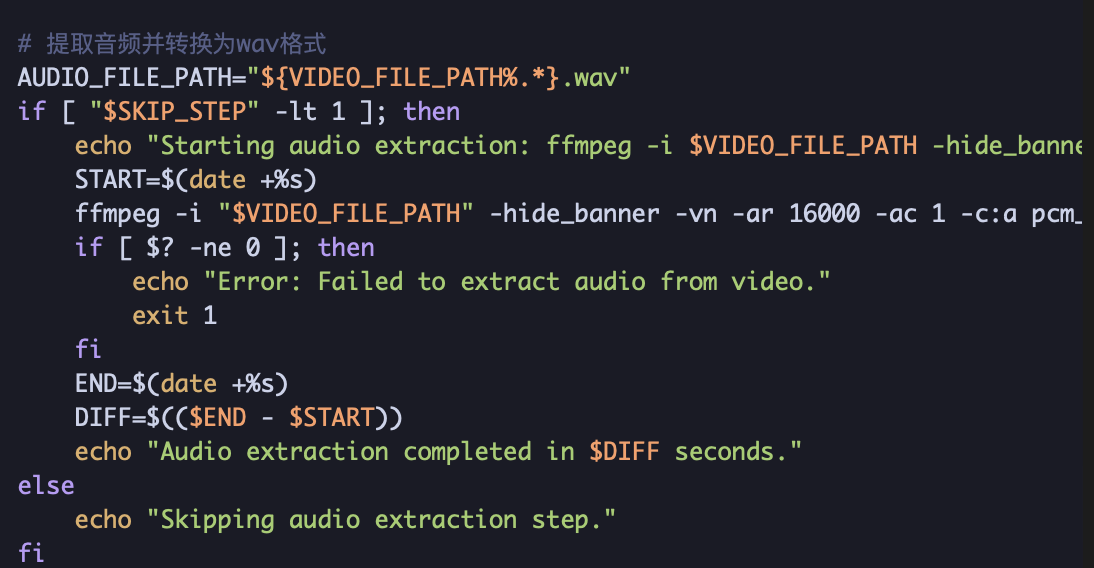
Then I needed some logging and whatnot, plus operations to delete intermediate files, and the ability to skip steps, etc.
Final result:
  1
  2
  3
  4
  5
  6
  7
  8
  9
 10
 11
 12
 13
 14
 15
 16
 17
 18
 19
 20
 21
 22
 23
 24
 25
 26
 27
 28
 29
 30
 31
 32
 33
 34
 35
 36
 37
 38
 39
 40
 41
 42
 43
 44
 45
 46
 47
 48
 49
 50
 51
 52
 53
 54
 55
 56
 57
 58
 59
 60
 61
 62
 63
 64
 65
 66
 67
 68
 69
 70
 71
 72
 73
 74
 75
 76
 77
 78
 79
 80
 81
 82
 83
 84
 85
 86
 87
 88
 89
 90
 91
 92
 93
 94
 95
 96
 97
 98
 99
100
101
102
103
104
105
106
107
108
109
110
111
|
#!/bin/bash

# Read environment variables
source .env

# Path of the input video file
VIDEO_FILE_PATH=\$1

# Number of steps to skip
SKIP_STEP=\$2

# Extract audio and convert to wav format
AUDIO_FILE_PATH="${VIDEO_FILE_PATH%.*}.wav"
if [ "$SKIP_STEP" -lt 1 ]; then
    echo "Starting audio extraction: ffmpeg -i $VIDEO_FILE_PATH -hide_banner -vn -loglevel error -ar 16000 -ac 1 -c:a pcm_s16le -y $AUDIO_FILE_PATH"
    START=$(date +%s)
    ffmpeg -i "$VIDEO_FILE_PATH" -hide_banner -vn -ar 16000 -ac 1 -c:a pcm_s16le -y "$AUDIO_FILE_PATH" -progress -
    if [ $? -ne 0 ]; then
        echo "Error: Failed to extract audio from video."
        exit 1
    fi
    END=$(date +%s)
    DIFF=$(($END - $START))
    echo "Audio extraction completed in $DIFF seconds."
else
    echo "Skipping audio extraction step."
fi

# Use whisper to generate the srt subtitle file
SRT_FILE_PATH="${AUDIO_FILE_PATH%.*}.wav.srt"
if [ "$SKIP_STEP" -lt 2 ]; then
    echo "Starting srt generation: $WHISPER_PATH -m $WHISPER_MODEL -l $WHISPER_LANGUAGE -f $AUDIO_FILE_PATH -t 8 -osr"
    START=$(date +%s)
    $WHISPER_PATH -m $WHISPER_MODEL -l $WHISPER_LANGUAGE -f "$AUDIO_FILE_PATH" -t "8" -osrt
    if [ $? -ne 0 ]; then
        echo "Error: Failed to generate srt file."
        exit 1
    fi
    END=$(date +%s)
    DIFF=$(($END - $START))
    echo "Srt generation completed in $DIFF seconds."
else
    echo "Skipping srt generation step."
fi

# Rename the srt file generated by whisper
RENAME_SRT_FILE_PATH="${AUDIO_FILE_PATH%.*}.srt"
if [ "$SKIP_STEP" -lt 3 ]; then
    echo "Starting srt file renaming: mv $SRT_FILE_PATH $RENAME_SRT_FILE_PATH"
    START=$(date +%s)
    mv "$SRT_FILE_PATH" "$RENAME_SRT_FILE_PATH"
    if [ $? -ne 0 ]; then
        echo "Error: Failed to rename srt file."
        exit 1
    fi
    END=$(date +%s)
    DIFF=$(($END - $START))
    echo "Srt file renaming completed in $DIFF seconds."
else
    echo "Skipping srt file renaming step."
fi

# Use ChatGPT to translate the subtitles
TRANSLATED_SRT_FILE_PATH="${AUDIO_FILE_PATH%.*}.out_${TRANSLATOR_TO_LANGUAGE}.srt"
if [ "$SKIP_STEP" -lt 4 ]; then
    echo "Starting srt translation: cli/translator.mjs --stream --temperature 0 --from $WHISPER_LANGUAGE --to $TRANSLATOR_TO_LANGUAGE --file $RENAME_SRT_FILE_PATH"
    START=$(date +%s)
    pushd $TRANSLATOR_PATH
    cli/translator.mjs --stream --temperature 0 --from "$WHISPER_LANGUAGE" --to "$TRANSLATOR_TO_LANGUAGE" --file "$RENAME_SRT_FILE_PATH"
    popd
    if [ $? -ne 0 ]; then
        echo "Error: Failed to translate srt file."
        exit 1
    fi
    END=$(date +%s)
    DIFF=$(($END - $START))
    echo "Srt translation completed in $DIFF seconds."
else
    echo "Skipping srt translation step."
fi

# Rename the output file
FINAL_SRT_FILE_PATH="${AUDIO_FILE_PATH%.*}.chs.srt"
if [ "$SKIP_STEP" -lt 5 ]; then
    echo "Starting final file renaming: mv $TRANSLATED_SRT_FILE_PATH $FINAL_SRT_FILE_PATH"
    START=$(date +%s)
    mv "$TRANSLATED_SRT_FILE_PATH" "$FINAL_SRT_FILE_PATH"
    if [ $? -ne 0 ]; then
        echo "Error: Failed to rename final srt file."
        exit 1
    fi
    END=$(date +%s)
    DIFF=$(($END - $START))
    echo "Final file renaming completed in $DIFF seconds."
else
    echo "Skipping final file renaming step."
fi

# Delete the wav file
if [ "$SKIP_STEP" -lt 6 ]; then
    echo "Deleting wav file: rm $AUDIO_FILE_PATH"
    rm "$AUDIO_FILE_PATH"
    if [ $? -ne 0 ]; then
        echo "Error: Failed to delete wav file."
        exit 1
    fi
else
    echo "Skipping wav file deletion step."
fi

echo "Subtitle generation completed successfully."
|
Results
Finally, here are the results I tested on a macbook m1 max 64g, with a 1:38:50 mp4. In the end:
1
2
3
4
|
Total time: 622 seconds.
Total tokens: 72580
Total cost: 0.145 USD
Total number of subtitles: 198
|
It took about 10 minutes (because my mp4 file is mounted over nfs, so reading and writing the wav went over the network, which alone took 75 seconds; whisper.cpp took 172 seconds, about 3 minutes; the rest of the time was spent calling openai to translate). Actually it is still quite fast.
Video screenshot:
Conclusion
In the end this script is very handy.
To sum up the above: I personally know linux commands, but I am not very familiar with shell script, and I didn’t want to write one because debugging is inconvenient. Using chatgpt is very convenient. In my personal opinion, gpt-4 is already quite accurate, on the condition that the requirements must be stated clearly, and during the modification process you need to occasionally remind it of the context again, otherwise it will forget.